
AI-augmented workflow
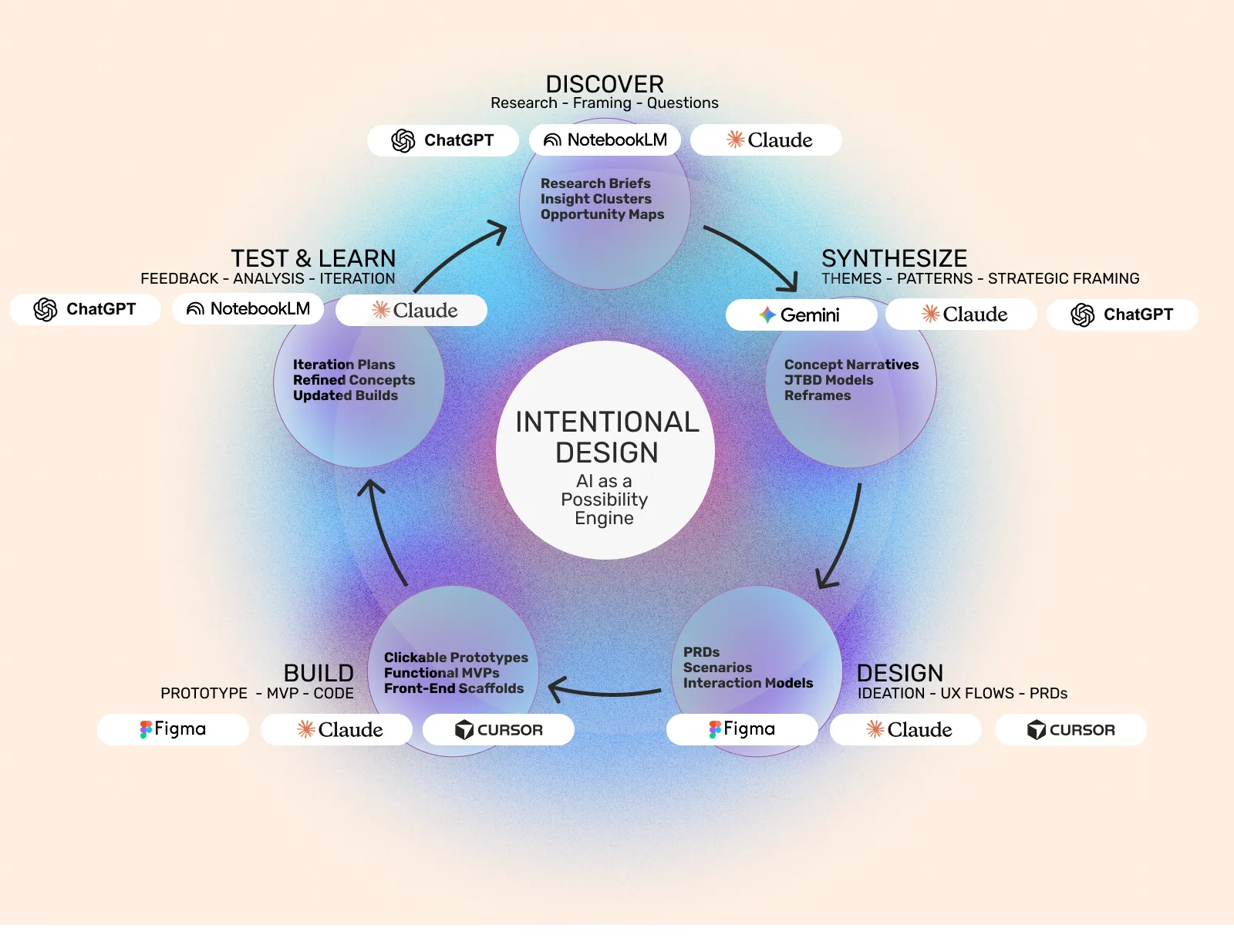
As I’ve used them, these AI tools are possibility engines. They expand my horizon and enable me to explore areas that I wouldn’t have normally considered. They make it possible for me to iterate faster – and most importantly, prototype earlier so that I can learn more about my target audience and reframe and refine my assumptions. I believe strongly in the “just enough” prototype. As a designer – it is sometimes hard to let go but I learned the power of this technique when I was UX lead at a mobile startup and would give my team just a few JPGs on a phone to share with people in Madison Square Park here in Manhattan. Even just a few JPGs of key screens would help us validate our ideas. These AI tools are all very good at that and help me work loose and fast. When it comes to final designs they require much more oversight and my workflow gets tighter and I end up just using two – Figma and Cursor.
One very important thing to note – when using ChatGPT, Claude or Gemini – insist on documentation. Whether it be a PRD, a user flow or scenario (or research from NotebookLM), keep asking those platforms to produce those documents. These documents help anchor the process and can be shared between platforms – a PRD from ChatGPT to Figma Make or Cursor – they are the essential artifacts that ensure forward momentum and keep it real.
Key Techniques
Start Every Phase with Documentation
The most important practice that works for me: always ask for a document you can pass to the next phase. A PRD from ChatGPT flows into Figma Make. A research brief from NotebookLM anchors your synthesis in Claude. These artifacts keep the process grounded and referenceable.
Prompt: Create a [one-page brief/PRD/user flow] for [specific goal]. Keep it structured and portable so I can hand it to [next tool/stakeholder].
The “Just Enough” Prototype Spec
Before building anything, define the minimum fidelity needed to test your hypothesis.
Prompt: I need to test [specific assumption] with users. What’s the minimum prototype I need? List: essential screens, required interactions, what can be faked, and 3 test tasks.
Rapid Research → Jobs-to-be-Done (JTBD)
Turn raw research into focused Jobs-to-be-Done statements that guide design.
Prompt: Based on these findings [paste research], create a JTBD framework: the main job, functional/emotional needs, current solution gaps, and success criteria. Format as a one-page reference.
User Flow Before Pixels
Generate interaction flows before touching design tools.
Prompt: For [feature], map the user flow: entry points, each step, decision points, error states, and success outcome. Format as a step-by-step list.
Quick Feedback Synthesis
After testing, find patterns fast.
Prompt: Analyze these [X] test sessions. Give me: top 3 patterns, what worked, what failed, and prioritized fixes. Make it action-oriented.
Five More Prompts for Your Toolkit
After testing, find patterns fast.
When You’re Stuck: Reframe the Problem
I’m stuck on [problem]. Help me reframe this by asking me 5 questions that challenge my assumptions about the user, the context, or the constraint.
Competitive Analysis → Opportunity
Here are 3 competitors doing [similar thing]. Analyze their approaches and identify: what they all do the same (table stakes), what gaps exist, and 2-3 differentiation opportunities for us.
Feature → Benefit Translation
I have these features [list]. For each one, write the user benefit in this format:
”Unlike [current solution], this lets you [benefit] so you can [outcome].”
Make it customer-facing, not internal jargon.
Testing Scenarios from Thin Air
Create 3 realistic use scenarios for [feature/product] that include: user context, their goal, environmental factors, and potential friction points. Make them specific enough to use in testing.
Presentation Narrative from Documents
I’m attaching [PRD/research brief/design rationale]. Turn this into a 5-slide narrative for stakeholders: Problem, Insight, Solution, How It Works, Next Steps. Give me talking points for each slide.