
AI-augmented workflow
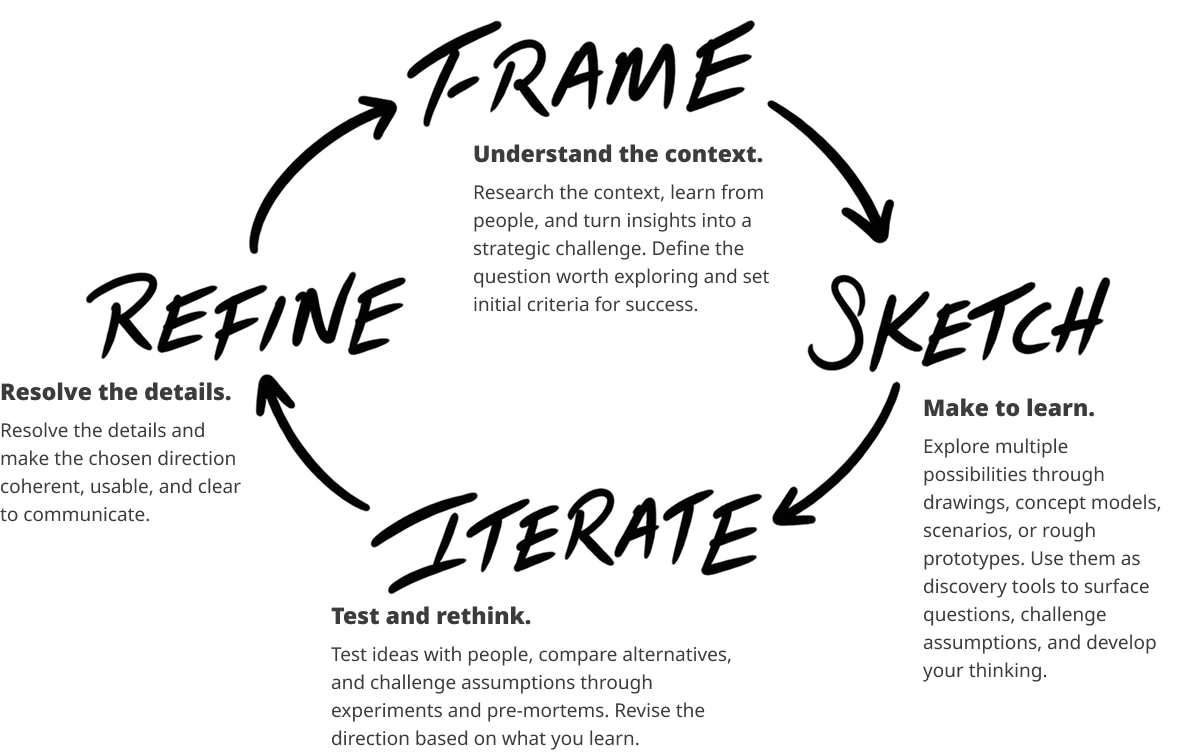
I sketched the steps in my process just to convey the evolving nature of it. Much is changing as I write. At core, I believe AI tools are possibility engines. They expand my horizon and enable me to explore areas that I wouldn’t have normally considered. I can understand my target audience, reframe and refine my assumptions more quickly than I’ve been able to. Yet there is an essential tension in producing more just because you can – and judging what is better or best in the work it produces. It’s been a wonderful place to play as I can bring my decades as a designer as a skill unto itself and learn throughout the process.
One very important thing to note – when using ChatGPT, Claude or Gemini – insist on documentation. Whether it be a PRD, a user flow or scenario (or research from NotebookLM), keep asking those platforms to produce those documents. These documents help anchor the process and can be shared between platforms – a PRD from ChatGPT to Figma Make or Cursor – they are the essential artifacts that ensure forward momentum and keep it real.
An AI-Native Design Toolkit
Maintain a Living Context + Evidence Pack
Instead of starting each phase with a new document, maintain one evolving source of truth for the project. Capture what you know, what you think you know, what you’re assuming, what you’ve decided, and what still needs to be tested.
The goal is to prevent context from degrading as work moves between people and AI tools.
Prompt: Update this project context using only the attached evidence. Separate: observations, interpretations, assumptions, decisions, open questions, and next experiments. Cite the evidence behind each observation and flag anything unsupported as a hypothesis.
Build the Smallest Executable Experiment
Before building anything, define the smallest amount of reality needed to answer the question.
That may be three screens, a clickable prototype, a functioning AI interaction, or a live workflow. Fidelity should be determined by what you need to learn—not by how polished the prototype looks.
Prompt: I need to test [specific assumption]. What is the smallest experiment that could prove or disprove it? List: what must be real, what can be simulated, required interactions, 3 test tasks, and what result would cause us to change or abandon the idea.
Evidence → Opportunities → Assumptions
Use research to identify opportunities before jumping directly to solutions.
AI can help synthesize patterns, but it should distinguish between what users actually said or did and what the team is inferring from that evidence.
Prompt: Based on this research [paste research], identify: key observations, recurring needs or tensions, opportunity areas, and the assumptions we would be making if we pursued each opportunity. Keep direct evidence separate from interpretation.
Behavior Before Interface
Before designing screens, model how the experience needs to behave.
For AI-enabled products especially, the important questions often involve intent, system responses, uncertainty, control, failure, and recovery—not simply which screen follows which.
Prompt: For [feature/product], create a behavioral model showing: user intent, system interpretation, system actions, decision points, uncertainty, user controls, error states, recovery paths, and successful outcomes. Flag anywhere human judgment should override automation.
Eval-Driven Learning
Decide what good looks like before you test.
Create a small set of representative scenarios and success criteria that can be reused as the product evolves. This makes it possible to see whether a new design, prompt, model, or workflow actually improves the experience—or simply changes it.
Prompt: Create an evaluation set for [feature/product]. Include 10 representative scenarios, expected behavior, failure conditions, and clear success criteria. Include edge cases and situations where the system should acknowledge uncertainty or decline to act.
Five More Prompts for Your Toolkit
1. Expose the Riskiest Assumption
When you’re stuck, don’t immediately generate more ideas. Identify what must be true for the current idea to work.
Prompt: For this concept [describe idea], identify the assumptions we are making about desirability, usability, feasibility, viability, and trust. Rank them by uncertainty and consequence. Identify the three assumptions most likely to kill the idea and propose the cheapest experiment for each.
2. Competitive Benchmark → Strategic Gap
Use competitors to understand how a particular job is being solved—not simply to create a feature comparison.
Prompt: Compare these competitors [list] against the user job [describe job]. For each, identify how they solve it, where friction remains, what users must compromise on, and what assumptions each competitor appears to make. Then identify 2–3 meaningful strategic gaps.
3. Human First, AI Second
When generating ideas with a team, capture human thinking before introducing AI-generated answers. This reduces anchoring and preserves diverse perspectives.
Prompt: Here are ideas generated independently by the team [paste]. First cluster them without adding new ideas. Then identify tensions, missing perspectives, and overlooked possibilities. Only after that, suggest 3 directions the group has not yet considered.
4. Synthetic Scenarios for Edge-Case Discovery
AI-generated users and scenarios are useful for finding situations you may have overlooked—but they are hypotheses, not research evidence.
Prompt: Generate 5 plausible edge-case scenarios for [feature/product]. Include user context, goal, environmental conditions, constraints, potential failure points, and what we would need to validate with real users. Clearly label all generated behavior as hypothetical.
5. Turn the Work into a Decision Record
Instead of jumping directly from research and design work into a presentation, document how the team arrived at the decision.
The presentation can come afterward.
Prompt: Using these project materials, create a concise decision record: what we observed, what we believed, what assumptions we tested, what we learned, what changed, what we decided, and what remains uncertain. End with the next decision or experiment required.
An Example: Vespertine
Vespertine is a travel app I’m designing for people who would rather wander than follow an itinerary. I’m testing it on a real week in Paris this November, as two working prototypes: Paris Reels and Paris Field Map. Claude was my design partner throughout, and I refined the designs in Figma. Every decision was mine. Try the prototype here.
How AI fit into the work
1. Diverge. Generate and explore multiple directions quickly.
2. Challenge. Attack assumptions, find weak logic and ask what’s missing.
3. Synthesize. Turn research and thinking into a coherent narrative and product thesis.
4. Visualize. Prototype ideas, diagrams and workflows to see and refine the concept.
5. Pressure-test. Review, iterate and set explicit go/no-go tests.
Step 1, Diverge: Two apps from one idea
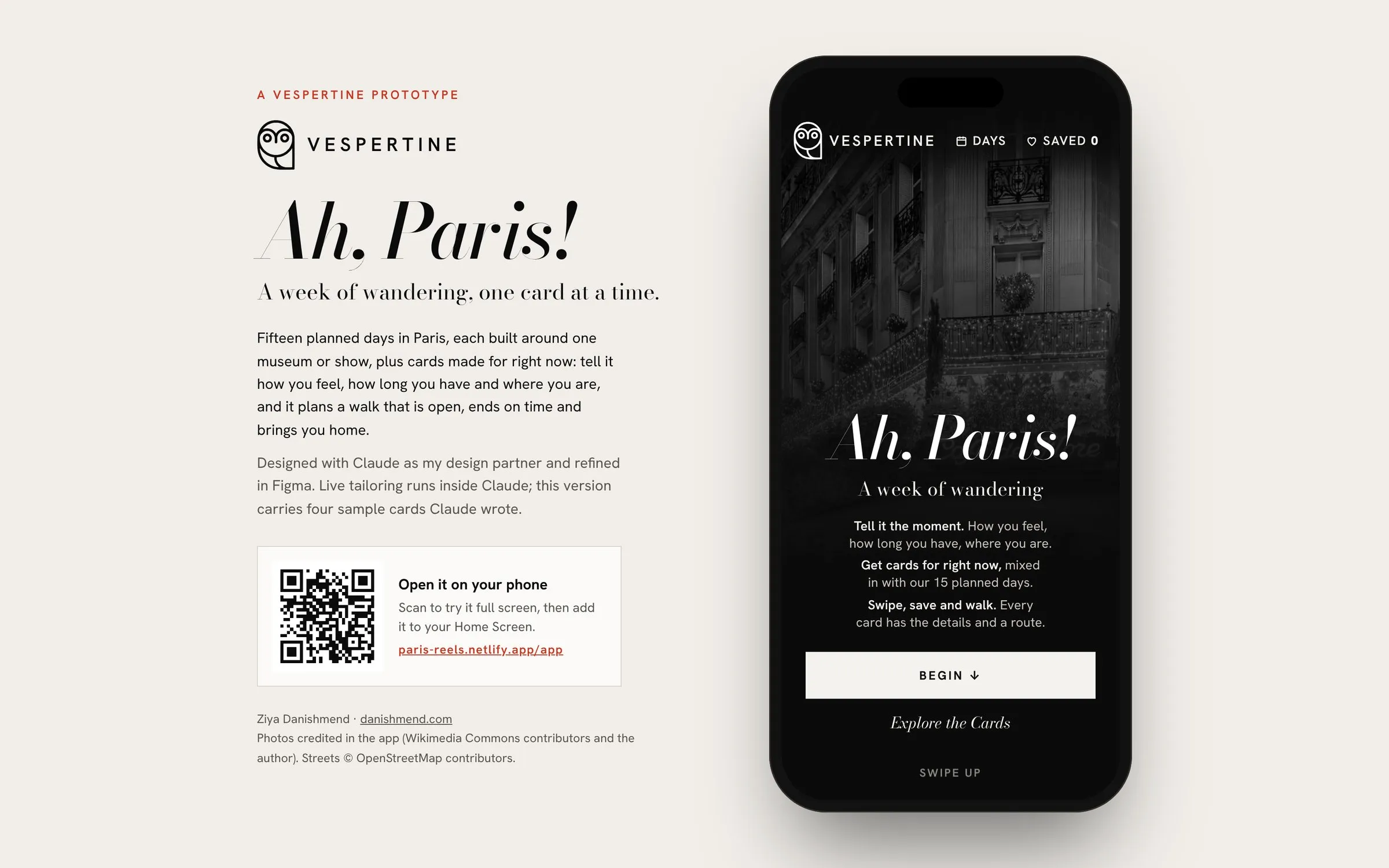
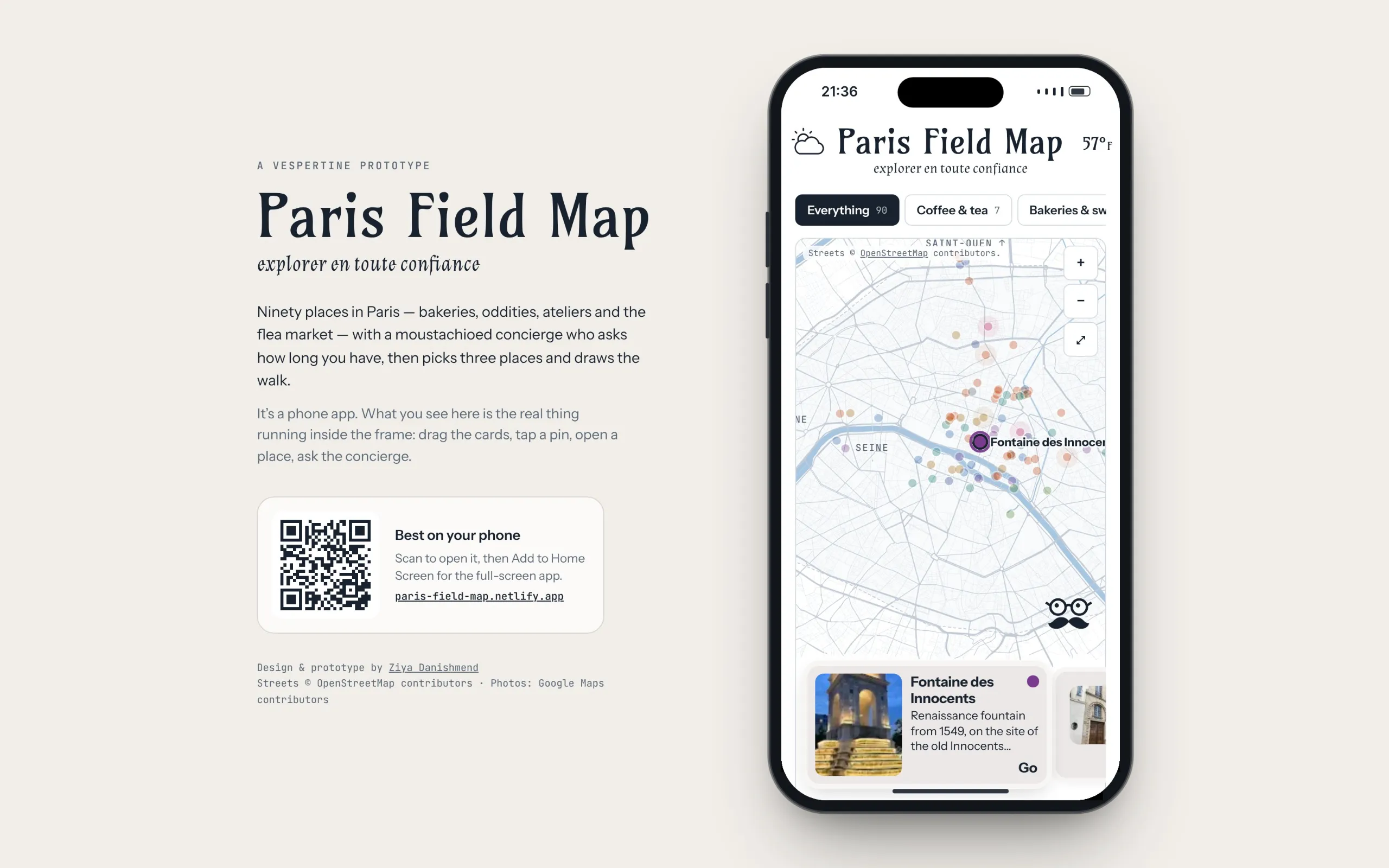
We explored the idea two ways. Paris Reels is a vertical feed of cards: fifteen planned days, plus cards made for right now from how you feel, how long you have and where you are. Then we shifted to Paris Field Map, the same idea as a map, with a concierge who asks one question: how long do you have? Building both showed which parts of the idea held up: time, mood and what’s open now.
Step 2, Challenge: Three personas, one gap
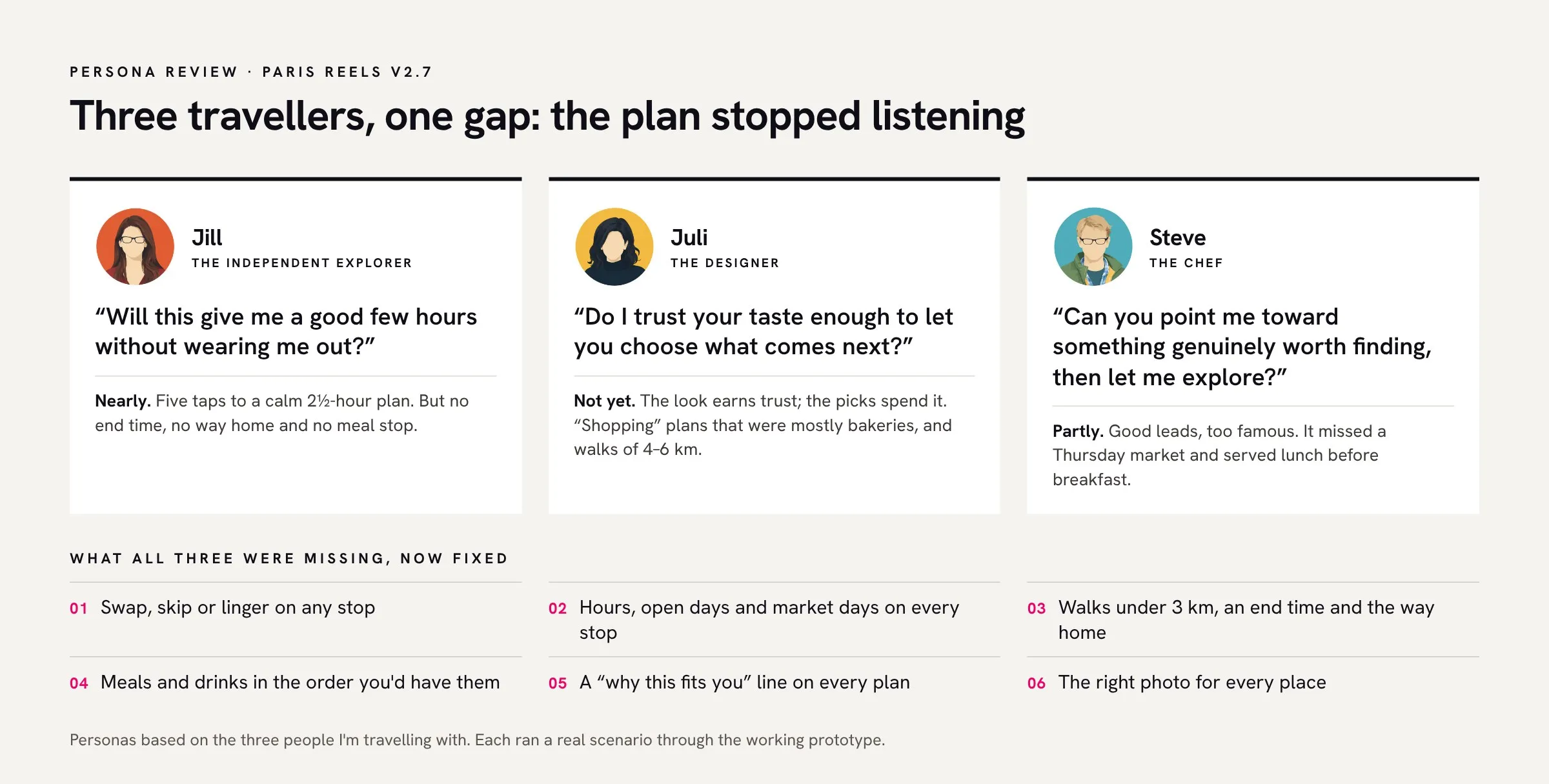
I wrote personas for the three people I’m travelling with, Jill, Juli and Steve, and ran each one through the working prototype with a real scenario. All three found the same gap: once a plan appeared, it stopped listening. Nobody could change a stop, check the opening hours or see when the day would end.
Step 3, Synthesize: Six fixes
We turned the findings into six fixes and built them in two rounds: swap, skip or linger on any stop; opening hours and market days on every stop; walks under 3 km with an end time and a way home; meals and drinks in the order you’d have them; a line on why each plan fits you; and the right photo for every place.
Step 4, Visualize: Finding a look
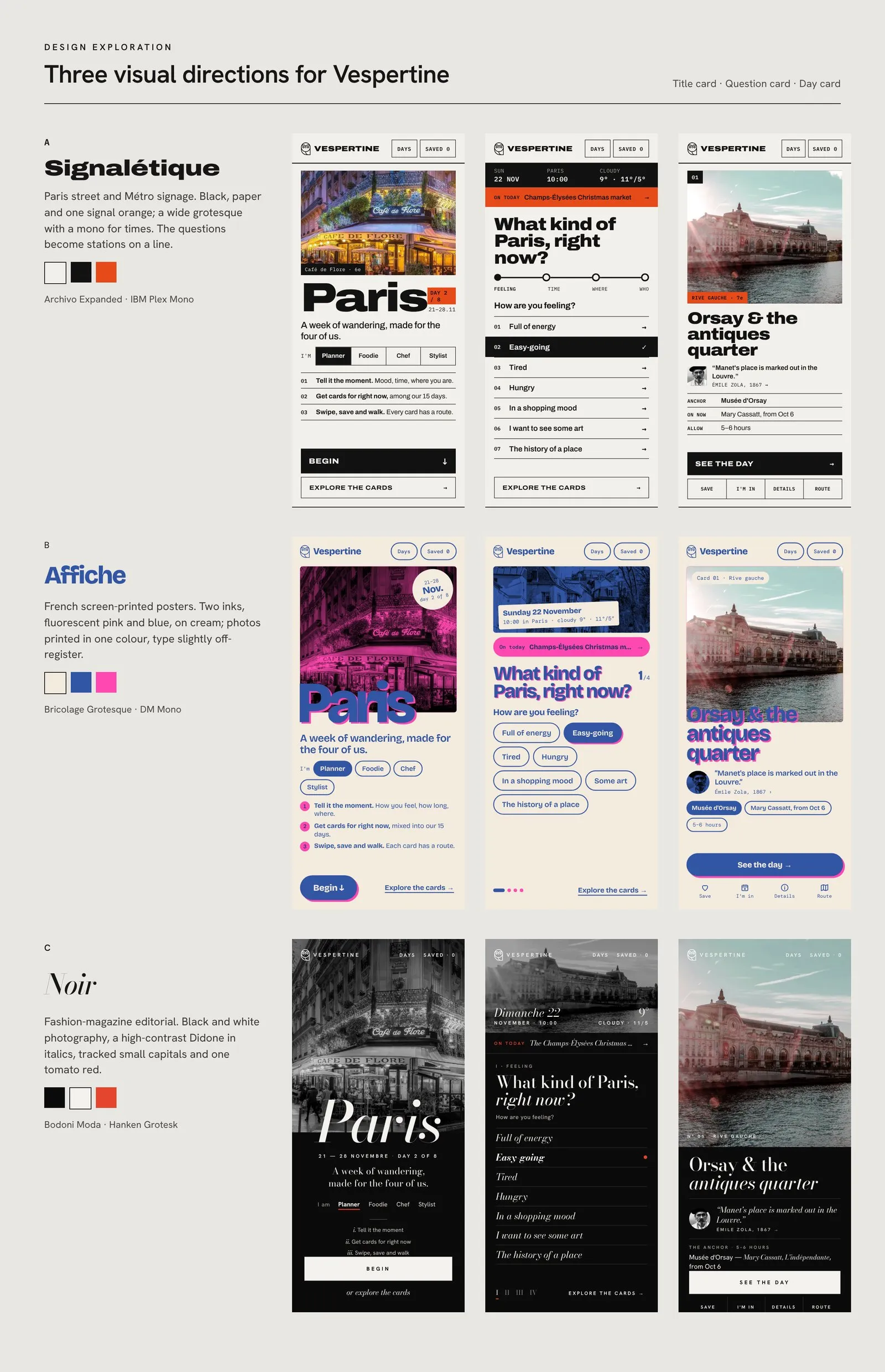
The first version leaned on a serif, brass and navy palette that felt a little too familiar, a touch of “designed with AI”. Claude and I explored three directions, Signalétique, Affiche and Noir, each on the title card, the question card and a day card. I chose Noir, and we carried it through the whole prototype.
Step 5, Pressure-test: Every round on my phone
Every round went onto my phone at two screen sizes before it counted as done. We ran the persona scenarios again after each round of fixes, and labelled opening hours as usual rather than live, so the app never claims more than it knows.
My role
The decisions were mine. I set the brief, wrote the personas, chose which findings to act on, picked the visual direction and judged every round on my phone.